Sign in or create a free account

It's free: your chats are saved and appear in the sidebar on any device. New here? Signing in creates your account. You can also keep chatting without one; nothing is saved. See how Pinguide handles your data (opens in a new tab).

How to use Pinguide

Pinguide is an AI pinball expert. Ask it anything about pinball, the way you'd ask a knowledgeable friend.

What you can ask

  • Rules and strategy for a specific machine: “How do I start multiball in Godzilla?”
  • Playing technique: flipper skills, nudging, tournament play
  • Buying, owning and repairing machines
  • History, designers, news and new releases

How answers work

  • Name a machine and Pinguide reads its library of rulesheets, strategy guides and manufacturer pages. The chips under the answer link to those sources.
  • For anything current (new releases, code updates, events, prices) it searches the web and links the pages it used.
  • “Thought process” opens a summary of how it worked the answer out.
  • Follow-up questions keep the context, so you don't need to repeat the machine name.

Tips

  • Use the machine's full name. If several machines share a name (Star Wars, for example), you get an answer for each.
  • Stop ends an answer early. Edit (on your message) and Retry (on the last answer) ask again. Copy copies the text.
  • Click a playfield photo to open it large, then zoom with the buttons, your mouse wheel, a pinch, or the + and − keys, and drag to look around.
  • Pinguide is AI and can make mistakes. For rule details that matter, check the linked rulesheet. 👍 and 👎 under an answer rate it; with a thumbs-down you can say what was wrong, which helps fix mistakes.
  • Need help with something else? Contact Pinguide.

Saving chats

  • No account is needed. Without one, your chats disappear when you close the tab.
  • Sign in with Google or an emailed link to keep your chats in the sidebar on any device, where you can search, rename and delete them. You can delete your account at any time. The privacy policy explains what's stored.

Boomerang / Flicker

Boomerang / Flicker

Bally Manufacturing Co. · 1974–1975

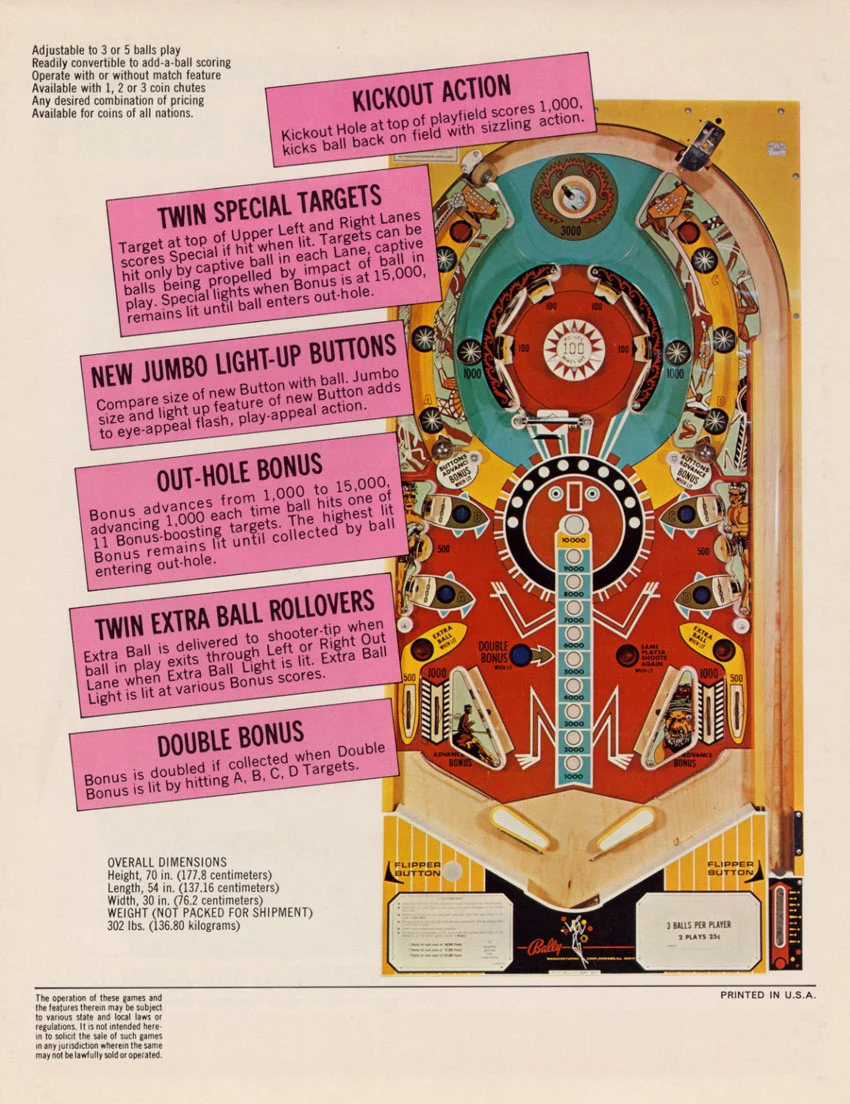
Boomerang, also known as Flicker, is a pinball machine whose playfield centers on a large teal circular area with a top kickout hole, a red starburst target zone, and a vertical bonus ladder running up the middle. Its layout packs many lit targets, round buttons, and eye-shaped bumpers into a compact space, which gives players a lot to aim for on every shot.

Ask Pinguide about Boomerang / Flicker

Playfield layout overview

  • The upper playfield is dominated by a large teal circle with a 3000 kickout hole at its top center.
  • A red circular area with a starburst 100 center sits below the kickout hole, surrounded by small 100 scoring spots and curved lanes with arrows.
  • The middle playfield has a vertical bonus ladder that climbs from 1,000 at the bottom to 10,000 at the top.
  • The lower playfield includes yellow outlanes marked 1000 and 500, triangular slingshots, and the ball shooter lane along the far right edge.

Lights and buttons to watch

  • Left and right Buttons Advance Bonus round buttons sit just above the middle section of the playfield.
  • Double Bonus with an arrow and a blue button sits just left of the middle of the bonus ladder.
  • Extra Ball lights sit in the yellow outlanes on both sides and are worth checking during play.
  • Oval eye-shaped bumpers with blue centers sit on the left and right sides, each with a nearby 500 value.

Playfield
Design team

  • Art: Christian Marche
  • Design: Jim Patla
  • Art: Dick White

Sources

This overview was written by Pinguide's AI from the sources below. For rule details that matter, check the original rulesheet.

Updated 2026-11-22.