Sign in or create a free account

It's free: your chats are saved and appear in the sidebar on any device. New here? Signing in creates your account. You can also keep chatting without one; nothing is saved. See how Pinguide handles your data (opens in a new tab).

How to use Pinguide

Pinguide is an AI pinball expert. Ask it anything about pinball, the way you'd ask a knowledgeable friend.

What you can ask

  • Rules and strategy for a specific machine: “How do I start multiball in Godzilla?”
  • Playing technique: flipper skills, nudging, tournament play
  • Buying, owning and repairing machines
  • History, designers, news and new releases

How answers work

  • Name a machine and Pinguide reads its library of rulesheets, strategy guides and manufacturer pages. The chips under the answer link to those sources.
  • For anything current (new releases, code updates, events, prices) it searches the web and links the pages it used.
  • “Thought process” opens a summary of how it worked the answer out.
  • Follow-up questions keep the context, so you don't need to repeat the machine name.

Tips

  • Use the machine's full name. If several machines share a name (Star Wars, for example), you get an answer for each.
  • Stop ends an answer early. Edit (on your message) and Retry (on the last answer) ask again. Copy copies the text.
  • Click a playfield photo to open it large, then zoom with the buttons, your mouse wheel, a pinch, or the + and − keys, and drag to look around.
  • Pinguide is AI and can make mistakes. For rule details that matter, check the linked rulesheet. 👍 and 👎 under an answer rate it; with a thumbs-down you can say what was wrong, which helps fix mistakes.
  • Need help with something else? Contact Pinguide.

Saving chats

  • No account is needed. Without one, your chats disappear when you close the tab.
  • Sign in with Google or an emailed link to keep your chats in the sidebar on any device, where you can search, rename and delete them. You can delete your account at any time. The privacy policy explains what's stored.

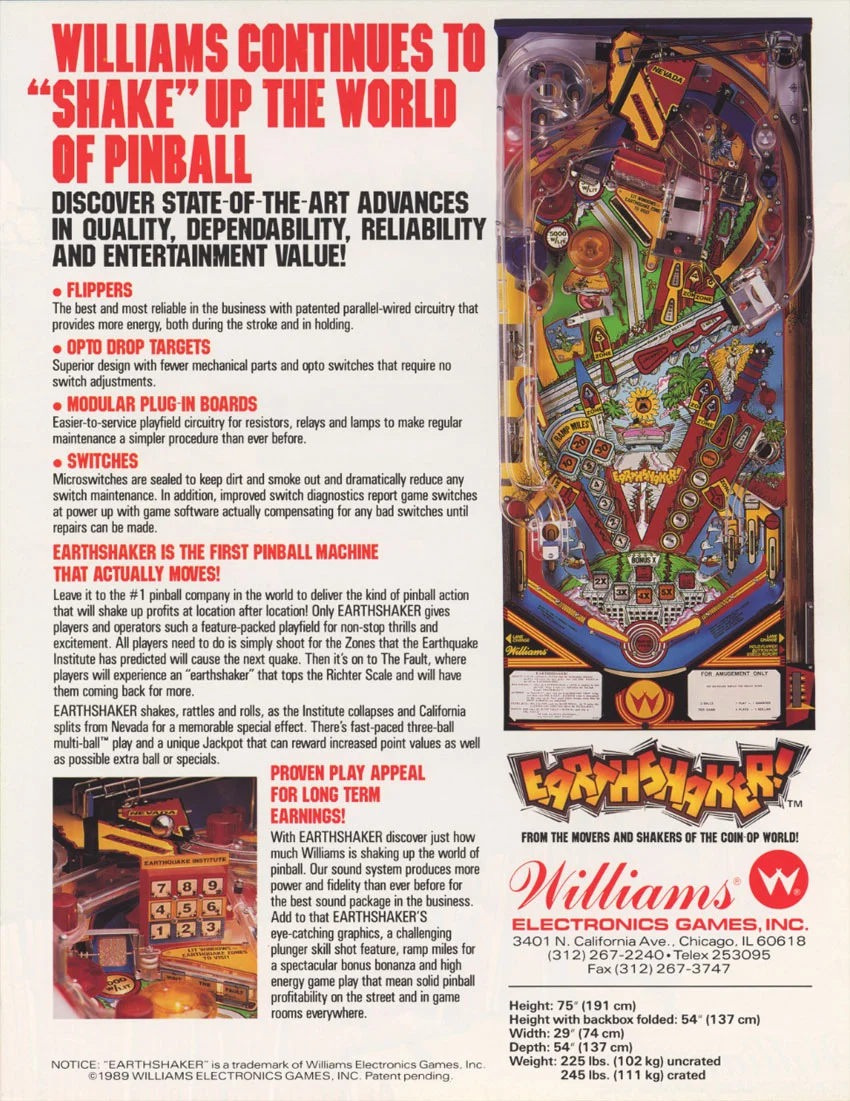
Earthshaker

Earthshaker

Williams Electronic Games Inc. · 1989

Earthshaker is a 1993 Williams pinball machine built around completing nine playfield zones for a building called the Earthquake Institute, which unlocks multiball and a large jackpot. What makes it distinctive is its progression, where the zones must be completed in an increasingly strict order as the game advances, and its fault ramp, which is the central shot of the game.

Ask Pinguide about Earthshaker

Starting Multiball

  • Multiball begins only after the building's zones are completed, which locks balls via the shelter or the fault ramp.
  • Early on, zones can be completed in any order, but later rounds require row-by-row and then numerical completion.
  • Once two balls are locked, the third ball is shot into play to begin three-ball multiball.
  • The jackpot must first be enabled with a center ramp shot before a fault trip claims it during multiball.

The Fault Trip

  • The fault ramp is the most important shot in the game and awards miles, spots zones, and helps lock balls.
  • Miles accumulate over the game and are reflected in the end-of-ball bonus along with fault trips.
  • During multiball, a fault trip can be worth a large fixed value, so the shot remains valuable throughout play.

Captive Ball and Quick Multiball

  • The Captive Ball's value rises with center ramp shots and can be hit at a high value to enable Quick Multiball.
  • Quick Multiball allows a second ball into play through the eject hole and enables the Million Shot.
  • Attempting the Captive Ball at its top value is considered a gamble by experienced players.

Playfield
Design team

  • Art: Tim Elliott
  • Callouts: Mark Ritchie
  • Design: Pat Lawlor
  • Software: Mark Penacho
  • Music: Chris Granner
  • Sound: Chris Granner
  • Music: Jon Hey
  • Mechanics: John Krutsch

Sources

This overview was written by Pinguide's AI from the sources below. For rule details that matter, check the original rulesheet.

Updated 2026-11-22.