Sign in or create a free account

It's free: your chats are saved and appear in the sidebar on any device. New here? Signing in creates your account. You can also keep chatting without one; nothing is saved. See how Pinguide handles your data (opens in a new tab).

How to use Pinguide

Pinguide is an AI pinball expert. Ask it anything about pinball, the way you'd ask a knowledgeable friend.

What you can ask

  • Rules and strategy for a specific machine: “How do I start multiball in Godzilla?”
  • Playing technique: flipper skills, nudging, tournament play
  • Buying, owning and repairing machines
  • History, designers, news and new releases

How answers work

  • Name a machine and Pinguide reads its library of rulesheets, strategy guides and manufacturer pages. The chips under the answer link to those sources.
  • For anything current (new releases, code updates, events, prices) it searches the web and links the pages it used.
  • “Thought process” opens a summary of how it worked the answer out.
  • Follow-up questions keep the context, so you don't need to repeat the machine name.

Tips

  • Use the machine's full name. If several machines share a name (Star Wars, for example), you get an answer for each.
  • Stop ends an answer early. Edit (on your message) and Retry (on the last answer) ask again. Copy copies the text.
  • Click a playfield photo to open it large, then zoom with the buttons, your mouse wheel, a pinch, or the + and − keys, and drag to look around.
  • Pinguide is AI and can make mistakes. For rule details that matter, check the linked rulesheet. 👍 and 👎 under an answer rate it; with a thumbs-down you can say what was wrong, which helps fix mistakes.
  • Need help with something else? Contact Pinguide.

Saving chats

  • No account is needed. Without one, your chats disappear when you close the tab.
  • Sign in with Google or an emailed link to keep your chats in the sidebar on any device, where you can search, rename and delete them. You can delete your account at any time. The privacy policy explains what's stored.

Nip-It

Nip-It

Bally Manufacturing Co. · 1973

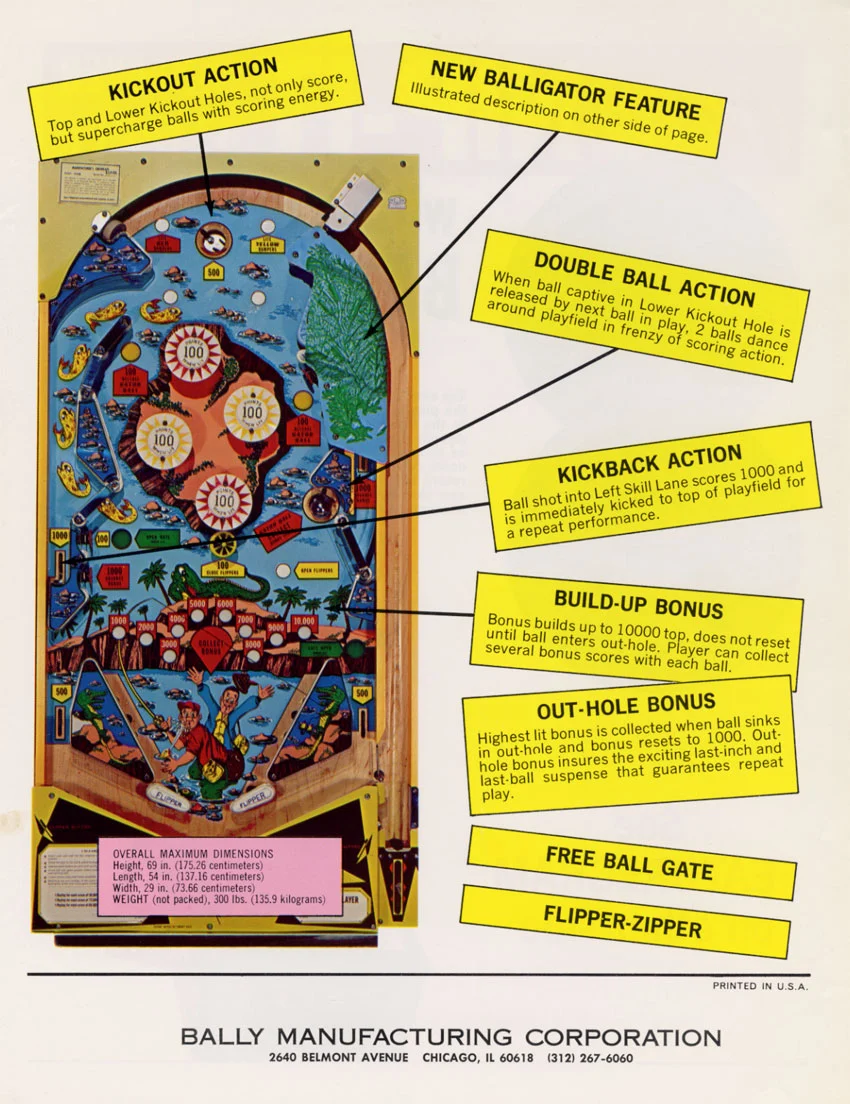
Nip-It is a 1973 Bally electromechanical pinball machine with reel-based scoring and an unusual third flipper-style button on the right that operates a gator grabber metal loop instead of a flipper. Its zipper flippers and the gator catch are what make it distinctive to play, and it is a game where keeping the flippers closed matters a great deal.

Ask Pinguide about Nip-It

Getting started

  • Keep the flippers closed as much as possible, since the center mushroom bumper closes them and the white rollover to its right opens them.
  • Start the skill shot by rolling over one of the top white discs and getting the ball into the 500 point saucer, then use the grabber button as the ball exits to catch it and feed the right flipper.
  • The grabber can also be pressed early to push the ball away to the left and change its path.

Starting multiball

  • Lock a ball in the lower right-side saucer to score the bonus and feed a second ball to the plunger lane.
  • Shoot one of the upper center release ball targets to start multiball, which is a good choice when your bonus is near its maximum.
  • Relock a ball after releasing to collect the bonus again, and remember that locked balls can be stolen by later players.

Gator and multiball strategy

  • The left gate or top shot can keep the gator feeding balls back to you, which is a riskier route than starting multiball directly.
  • On some machines the gator feed may drain down the center part of the time.
  • During multiball, try to keep one ball settled on the zipped flippers while knocking the other ball around.

Playfield
Design team

  • Art: Dick White
  • Animation: Ted Zale
  • Design: Ted Zale
  • Mechanics: Ted Zale
  • Concept: Ted Zale

Sources

This overview was written by Pinguide's AI from the sources below. For rule details that matter, check the original rulesheet.

Updated 2026-11-22.