Sign in or create a free account

It's free: your chats are saved and appear in the sidebar on any device. New here? Signing in creates your account. You can also keep chatting without one; nothing is saved. See how Pinguide handles your data (opens in a new tab).

How to use Pinguide

Pinguide is an AI pinball expert. Ask it anything about pinball, the way you'd ask a knowledgeable friend.

What you can ask

  • Rules and strategy for a specific machine: “How do I start multiball in Godzilla?”
  • Playing technique: flipper skills, nudging, tournament play
  • Buying, owning and repairing machines
  • History, designers, news and new releases

How answers work

  • Name a machine and Pinguide reads its library of rulesheets, strategy guides and manufacturer pages. The chips under the answer link to those sources.
  • For anything current (new releases, code updates, events, prices) it searches the web and links the pages it used.
  • “Thought process” opens a summary of how it worked the answer out.
  • Follow-up questions keep the context, so you don't need to repeat the machine name.

Tips

  • Use the machine's full name. If several machines share a name (Star Wars, for example), you get an answer for each.
  • Stop ends an answer early. Edit (on your message) and Retry (on the last answer) ask again. Copy copies the text.
  • Click a playfield photo to open it large, then zoom with the buttons, your mouse wheel, a pinch, or the + and − keys, and drag to look around.
  • Pinguide is AI and can make mistakes. For rule details that matter, check the linked rulesheet. 👍 and 👎 under an answer rate it; with a thumbs-down you can say what was wrong, which helps fix mistakes.
  • Need help with something else? Contact Pinguide.

Saving chats

  • No account is needed. Without one, your chats disappear when you close the tab.
  • Sign in with Google or an emailed link to keep your chats in the sidebar on any device, where you can search, rename and delete them. You can delete your account at any time. The privacy policy explains what's stored.

Sorcerer

Sorcerer

Williams Electronic Games Inc. · 1985

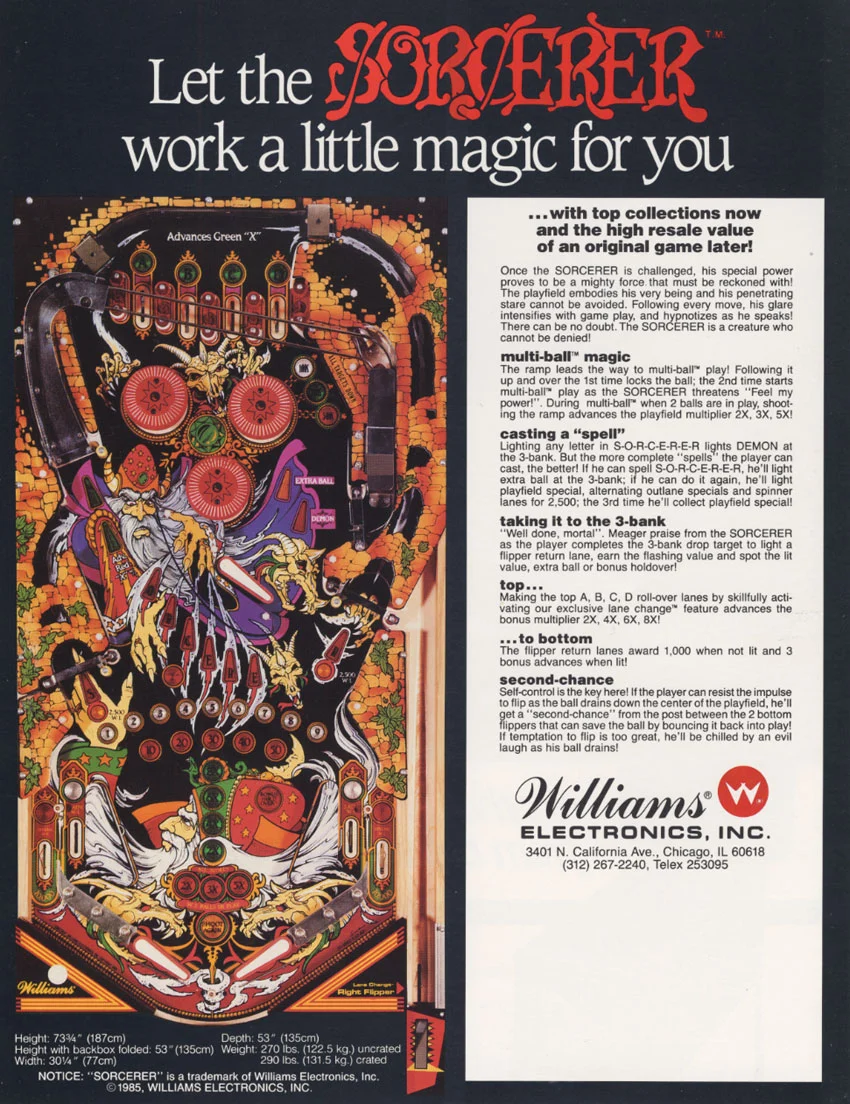
Sorcerer is a 1985 Williams solid-state pinball machine with a wizard theme, and it is built around multiball, with ball locks and a playfield multiplier that climbs during play. Its signature feature is that multiball scoring is doubled and the letters spelling S-O-R-C-E-R-O-R light the spinners for big payouts once you are in multiball.

Ask Pinguide about Sorcerer

Starting multiball

  • Multiball is started by making two shots up the left ramp, though some lock saucers are unreliable and let the ball skip through and out the gate below.
  • Locks can be stolen by opponents, so watch for that when you are building toward multiball.
  • The multiball lock shot is worth taking seriously because the playfield multiplier needs to reach 5X before the upper playfield is shot freely.

Multiball scoring

  • During multiball, playfield scoring is doubled, and shooting the lock ramp again raises the playfield multiplier step by step up to 5X.
  • Once the multiplier is maxed, the upper playfield can be shot freely, with the exception of times when the spinners are lit.
  • Completing the Sorcerer letters lights the spinners, and it is generally best to shoot them only once you are in multiball.

Bonus and risk

  • Bonus is built from lanes and targets, and a bonus multiplier rises as you finish sets of the top A-B-C-D lanes.
  • Don't aim at the Sorcerer letters in single-ball play because they are a drain risk.
  • Most out-of-control balls come from grazing the outer ramp side, the outer right side of the left spinner, or falling just right of the upper flipper.

Playfield
Design team

  • Design: Mark Ritchie
  • Art: Pam Erickson
  • Software: Ed Suchocki
  • Software: Dave Rzepka

Sources

This overview was written by Pinguide's AI from the sources below. For rule details that matter, check the original rulesheet.

Updated 2026-11-22.