The Simpsons Pinball Party
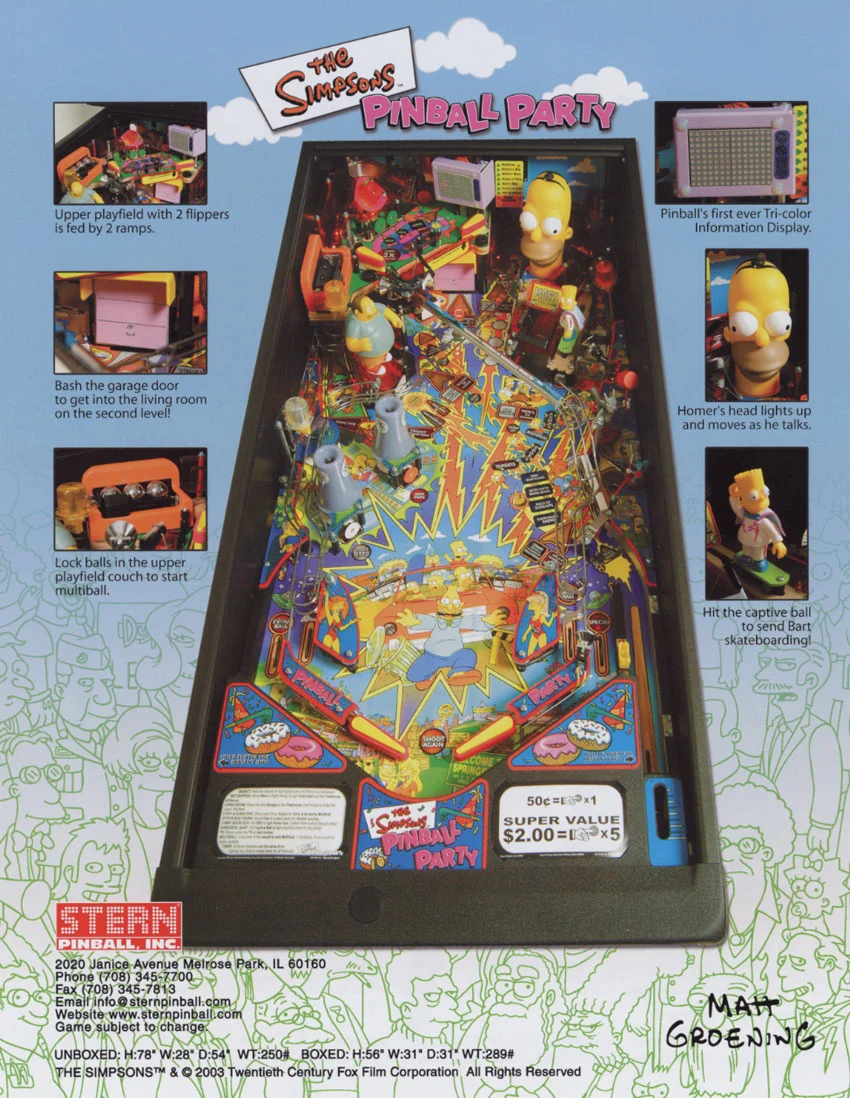
The Simpsons Pinball Party is a Stern pinball machine built around the Springfield family, with a two-level playfield and a mini-playfield reached through the garage door. Its main appeal is stacking: players are encouraged to start as many modes, multiballs and features as possible at once rather than finishing any single one.
Ask Pinguide about The Simpsons Pinball Party
Core strategy: stacking
- Starting a new mode or feature is generally worth more than finishing one that is already running.
- You can start any mode, multiball or feature at any time, even while others are active, so there is no need to line them up.
- All modes and features share a single timer, so starting anything that uses the timer resets it for everything else.
- Using the right loop when it is lit can keep your running modes going because it grants double scoring for a short period on the same timer.
Reaching the mini-playfield and multiball
- Shoot the garage or the left ramp to get up to the mini-playfield.
- The couch on the mini-playfield starts Couch Multiball when it receives three pinballs.
- Itchy and Scratchy multiballs are easier to reach by shooting the saucer on the right side of the machine, though they are less valuable than Couch Multiball.
Modes and the TV
- Shooting into the TV when it is lit starts TV modes, which are relit on the right orbit.
- Mystery Awards at the garage are not random in Competition Mode and often light valuable features, so they are worth pursuing.
Notable features on the playfield
- A talking, moving Homer head and a Bart figure on a skateboard are attached to a captive ball feature.
- Itchy and Scratchy drop targets and Comic Book Guy are also featured on the playfield.
Playfield
Design team
- Animation: Mark Galvez
- Art: Kevin O'Connor
- Software: Dwight Sullivan
- Mechanics: Ray Tanzer
- Design: Keith P. Johnson
- Software: Keith P. Johnson
- Art: Margaret Hudson
- Mechanics: Wesley Chang
- Design: Joe Balcer
- Music: Dan Forden
- Sound: Dan Forden
- Music: Chris Granner
- Sound: Chris Granner
Sources
This overview was written by Pinguide's AI from the sources below. For rule details that matter, check the original rulesheet.
Updated 2026-11-22.