Sign in or create a free account

It's free: your chats are saved and appear in the sidebar on any device. New here? Signing in creates your account. You can also keep chatting without one; nothing is saved. See how Pinguide handles your data (opens in a new tab).

How to use Pinguide

Pinguide is an AI pinball expert. Ask it anything about pinball, the way you'd ask a knowledgeable friend.

What you can ask

  • Rules and strategy for a specific machine: “How do I start multiball in Godzilla?”
  • Playing technique: flipper skills, nudging, tournament play
  • Buying, owning and repairing machines
  • History, designers, news and new releases

How answers work

  • Name a machine and Pinguide reads its library of rulesheets, strategy guides and manufacturer pages. The chips under the answer link to those sources.
  • For anything current (new releases, code updates, events, prices) it searches the web and links the pages it used.
  • “Thought process” opens a summary of how it worked the answer out.
  • Follow-up questions keep the context, so you don't need to repeat the machine name.

Tips

  • Use the machine's full name. If several machines share a name (Star Wars, for example), you get an answer for each.
  • Stop ends an answer early. Edit (on your message) and Retry (on the last answer) ask again. Copy copies the text.
  • Click a playfield photo to open it large, then zoom with the buttons, your mouse wheel, a pinch, or the + and − keys, and drag to look around.
  • Pinguide is AI and can make mistakes. For rule details that matter, check the linked rulesheet. 👍 and 👎 under an answer rate it; with a thumbs-down you can say what was wrong, which helps fix mistakes.
  • Need help with something else? Contact Pinguide.

Saving chats

  • No account is needed. Without one, your chats disappear when you close the tab.
  • Sign in with Google or an emailed link to keep your chats in the sidebar on any device, where you can search, rename and delete them. You can delete your account at any time. The privacy policy explains what's stored.

Venom

Venom

Stern Pinball Inc. · 2023

Venom is a Stern pinball machine designed by Brian Eddy with rules by Dwight Sullivan, where the player picks a symbiote host each ball and fights bosses to stop Carnage from reviving Knull. It stands out for its Insider Connected progression, where level and unlocked hosts carry over between games for registered players.

Ask Pinguide about Venom

Getting started

  • Begin by choosing a host, since each host changes the rules and music of the game.
  • Work through the three mini-mode ladders by shooting the flashing arrows in quick two-shot combos, which progress your host's path and light Mayhem Multiball locks.
  • Once a full column of mini-modes is completed, you can change hosts at the left ramp, which helps you keep the ball moving through the grid.

Mayhem Multiball

  • Light the green lock shots and lock balls in the canisters to start Mayhem Multiball.
  • The multiball is played in two phases, first with quick jackpots from the left ramp and scoop, then with full jackpot shots that can lead to a super jackpot.
  • Holding the action button can abort the multiball to lock more balls for extra perks.

Battles and Carnage

  • Battle modes against minor bosses like Riot, Agony, Phage and Lasher require depleting two health bars using flashing shots.
  • Carnage modes start by locking the captive ball back into Ravencroft, and the center ramp lights the next mode in sequence.
  • Battle modes and Carnage modes cannot run at the same time, so plan your progress through the grid carefully.

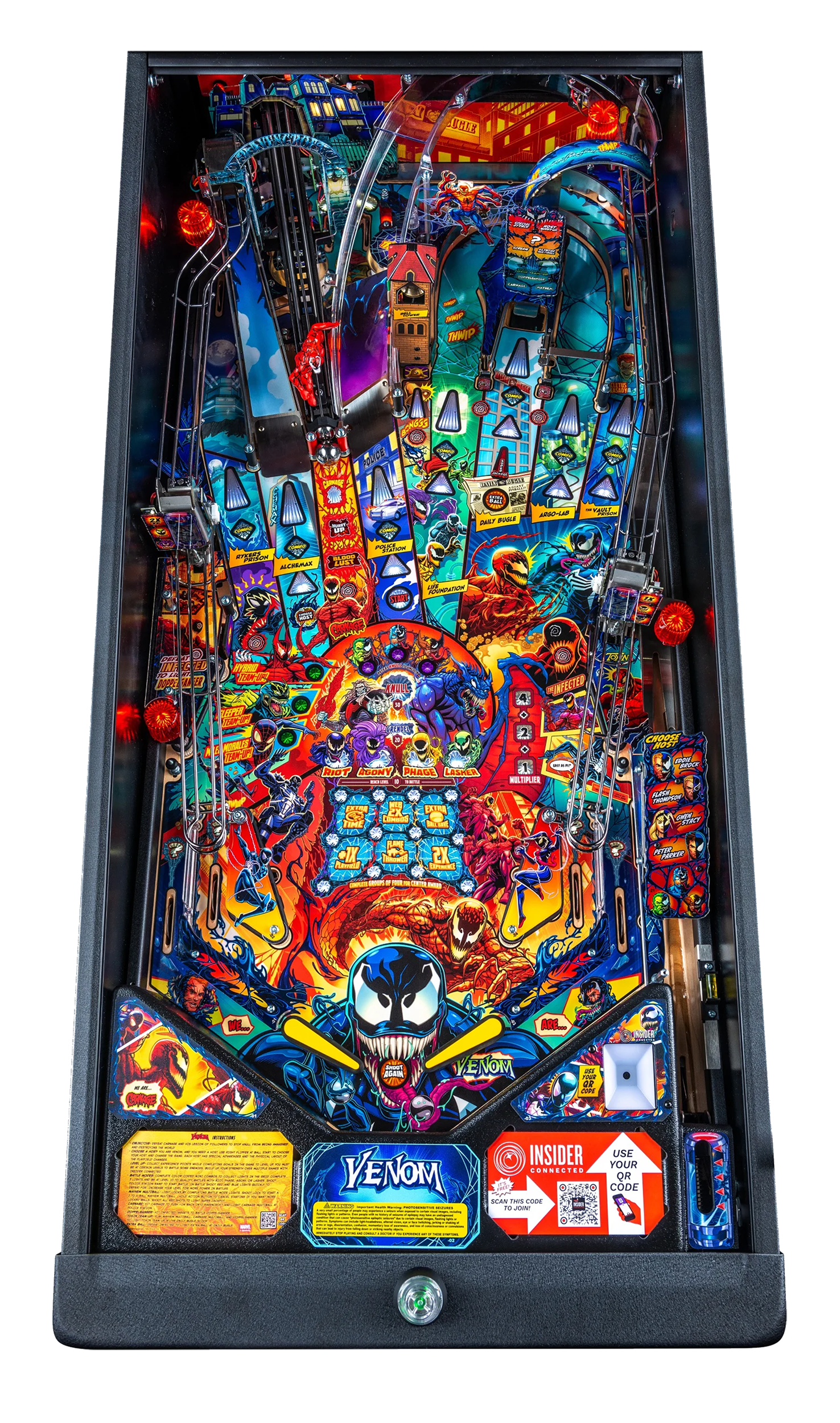
Playfield
Design team

  • Mechanics: Kevin Kolodziej
  • Design: Brian Eddy
  • Art: Jeremy Packer (Zombie Yeti)
  • Animation: Paul Chamnankit
  • Software: Dwight Sullivan
  • Software: Raymond Davidson
  • Software: Corey Stup
  • Sound: Jerry Thompson
  • Music: Mark Tremonti

Sources

This overview was written by Pinguide's AI from the sources below. For rule details that matter, check the original rulesheet.

Updated 2026-11-22.